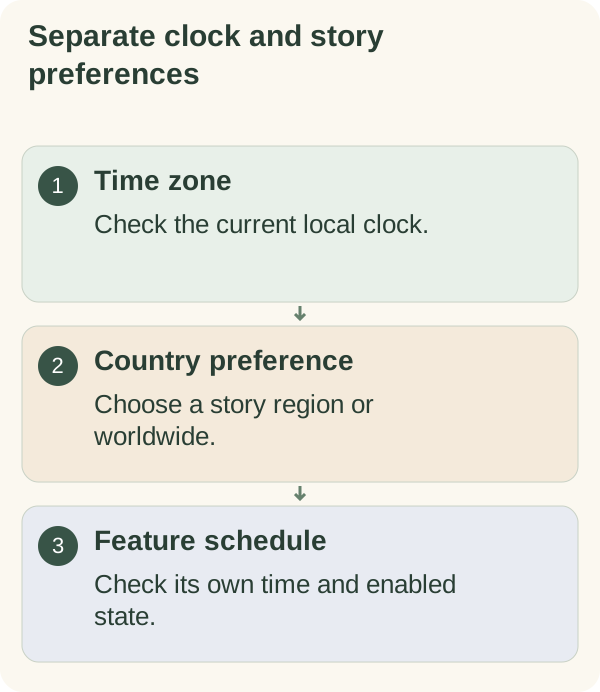
Save the time zone that matches your local clock. If you type your country, Armored Kitten saves it and uses it to choose local stories and suggest your time zone, language and Money currency. You can change it anytime in Settings. Review these as separate settings: changing your country does not correct a reminder's time.
Set and verify your time zone
Open /settings in the private chat, choose Messages, then open the time-zone control. Enter a named IANA zone such as Asia/Manila, Europe/London or America/New_York, or use a relevant city button when offered. If the entry is rejected, follow the current prompt and check the spelling.
Reopen Settings after saving. Verify the zone and the displayed local time. Named zones follow the clock rules in the service's installed time-zone data, including applicable daylight-saving changes. The Python time-zone documentation explains this distinction from a fixed UTC offset.
The setting does not change your device clock or Telegram timestamps. Check each feature's own enabled state and saved time as well.
Choose or skip a country preference
Open Messages in Settings and use the country control to enter a story preference. When the prompt offers a worldwide choice, use it or send Skip. The selector can prefer an eligible reviewed story associated with that country, but a preference is not a guarantee of a regional story every day.
If optional Telegram location sharing is offered, you can continue manually. A shared location can produce a time-zone or country suggestion for you to review and apply. Do not treat a suggested place as a saved setting until the bot confirms the choice. Check the resulting Settings card, especially near borders or when travelling.
Fix a schedule that arrives at the wrong local time
First verify the saved zone and current local time. Correct the zone before compensating with a different send hour. Then check the daily time and format or checklist reminder settings.
A zone correction does not lift a global stop or enable every category. Use message controls if the schedule is correct but outreach is paused. Review the privacy guide before sharing information you do not need for setup.