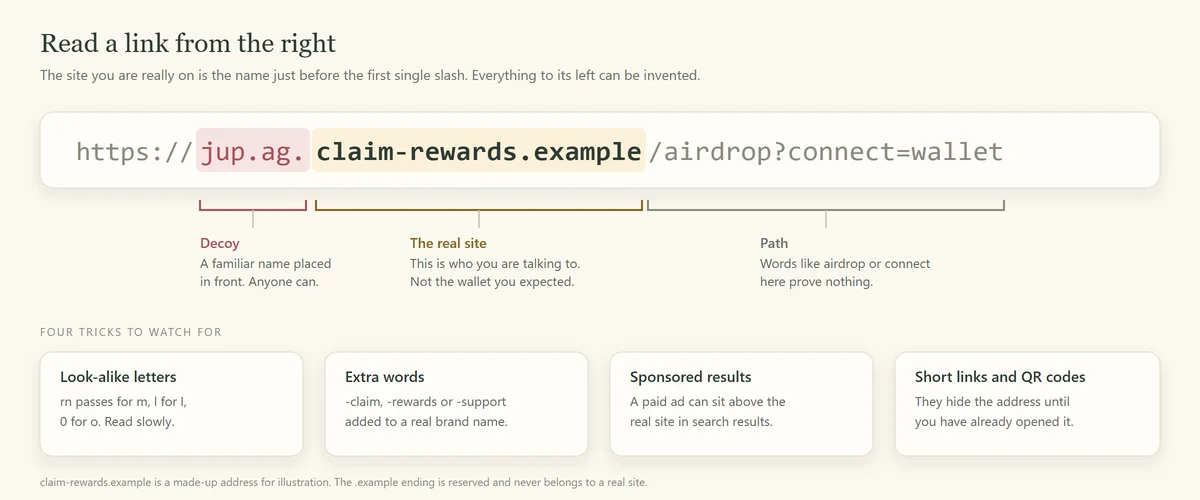
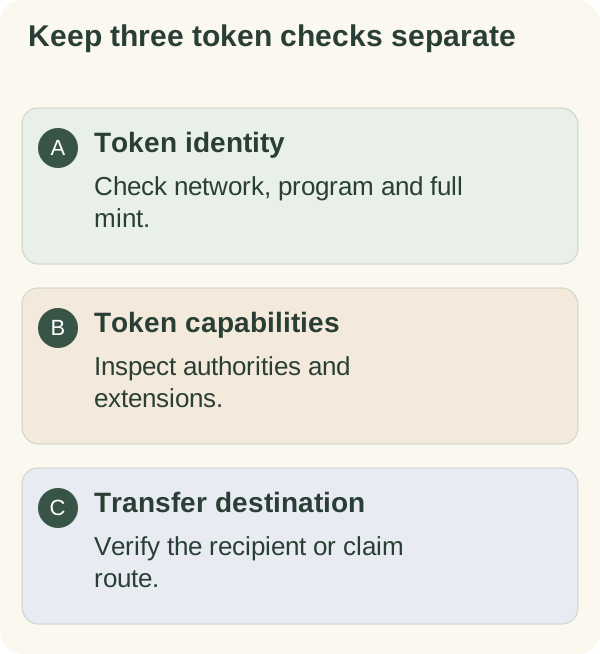
Check the full token mint and intended recipient address before relying on a name, logo or shortened history entry. Token identity, token permissions and transfer destination are separate checks; passing one does not establish the others.
Why fake tokens are everywhere
Names and pictures can be copied. On Solana, a mint account identifies a specific token and holds information such as supply and authorities, as the Solana token documentation explains. Confirm the intended network and token program as well as the mint address.
A matching mint establishes which token you are inspecting. It does not establish the issuer's honesty, a market value or whether you will be able to sell it.
How to check a token's mint address
Obtain the expected mint from an independently verified project source. Compare the whole address with the token shown in your wallet or explorer on the intended network. Do not choose a listing solely by its ticker, icon, popularity or a partial address.
Inspect the token's program and relevant settings, then review the actual wallet request before approving an operation. If a display shortens the address, open a trusted detail view rather than guessing from the first and last characters.
Example: two listings with the same name
Two listings can both say "ARMORED" while referring to different mint addresses. The shared name is not an identity check. Start from the project's published information, compare the expected mint in full and verify it again in the operation you intend.
This example does not certify a current mint configuration or recommend buying a token. The token-buying guide describes the separate checks needed before a purchase.
What a token's settings can tell you
| Setting | What to investigate |
|---|---|
| Mint authority | Whether an authority can create more units. Revocation is not a promise about price or demand. |
| Freeze authority and account state | Whether the ordinary freeze mechanism is available, and whether your token account is currently usable. |
| Token extensions | Whether fees, delegates, transfer restrictions or additional program logic apply. |
| Supply distribution and liquidity | What assumptions you are making about holders, trading and the ability to exit. |
Solana's freeze documentation explains that freezing prevents receiving, transferring and burning until an account is thawed. Removing a freeze authority should not be read as a blanket guarantee that every possible transfer restriction is absent.
Token extensions add distinct capabilities. For example, a permanent delegate can authorise transfers or burns for that mint, and an individual token-account owner cannot revoke that mint-level delegate. Read the actual configuration rather than treating every extension as harmless or every authority as proof of fraud.
Rug pulls and honeypots
A chart or successful purchase does not prove that you can later exit a position. Restrictions, missing liquidity and issuer behaviour are different risks. An explorer is a source of technical facts to investigate, not an audit certificate.
Spam tokens and NFTs you never asked for
An unexpected asset can contain a link or instruction designed to draw you into another action. Do not follow metadata links or use an unfamiliar site to "claim" or dispose of it. Use the wallet's documented hide or report controls instead of assuming you must interact with every item shown.
Address poisoning: the copy-paste trap
An attacker can place a similar-looking address in transaction history and hope you reuse it. Trust Wallet's explanation describes how look-alike entries exploit shortened address displays.
Obtain the recipient's current address through a trusted route, not an unexpected history entry. Compare it in full against the final destination. A saved contact helps only if it was verified correctly and remains the intended address.
Habits that reduce address errors
Recheck the destination after copying or scanning. Verify any claimed address change independently. A QR code and a small test transfer do not replace checking the final transaction; they can still use the wrong destination.
Before you gift any token
Confirm that the recipient wants the asset and understands its network and handling requirements. Review token identity, permissions, destination or claim mechanism, costs and the actual status of the operation separately.
A private claim link has its own access rules and is not the same as an email-bound transfer. Read gift safety and Solana gifting methods before choosing a flow. If a result is uncertain, inspect it before repeating the action.
If funds went to the wrong address
Keep the transaction reference and contact the service involved through its official route. A wallet provider cannot promise to reverse a settled transfer, and a recovery pitch is not proof that funds can be returned. The social-scam guide covers that follow-up risk.
Armored Kitten is an independent greeting studio and is not affiliated with or endorsed by Jupiter. Token gifts are optional, can change in value, and are not investment advice. Check the rules that apply where you live.