Pause and verify a link
- Step 1Leave the unexpected link
- Step 2Open the official service independently
- Step 3Reject any wallet action you did not start
Before using a crypto link, check the destination you actually reached and the action your wallet is being asked to authorise. A familiar name, HTTPS connection or successful wallet connection does not establish that the next request is safe.
What a crypto phishing link is after
A deceptive page can ask for recovery material, account credentials, an installation or a wallet approval. These are different exposures and need different recovery steps. A copied design or a reassuring chat message is not evidence that a page belongs to the service it imitates.
Where crypto phishing links show up
Links can arrive through messages, search ads, social replies, compromised accounts or unexpected token metadata. Treat the route as something to verify, even when the account or logo looks familiar.
A QR code can conceal the same problem. The FTC's QR-code guidance recommends inspecting the address and contacting the organisation through a known route when an unexpected message creates urgency. Scanning is not verification.
Inspect the full address
Expand the browser's address bar. Find the hostname and compare it with the exact address you intended to use. Do not rely on the name printed on a button or the address suggested by a search result.
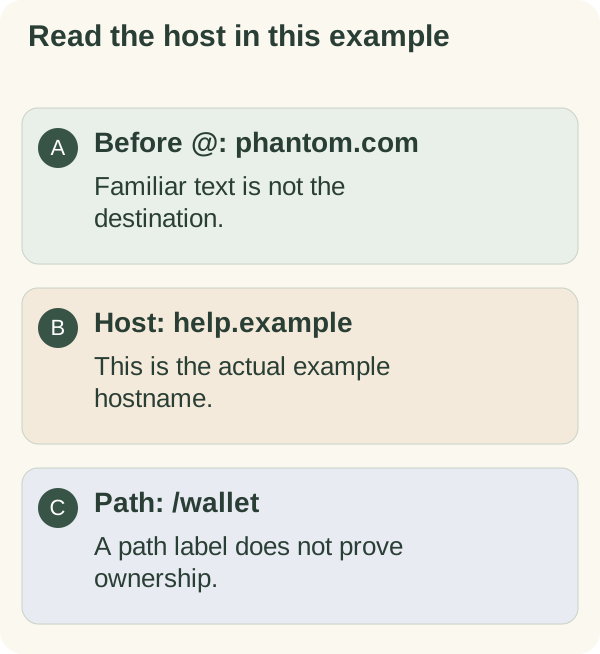
These are invented examples using the reserved .example ending; they are not links to visit:
| Example address | What it illustrates |
|---|---|
https://phantom.com.help.example/wallet | The hostname is phantom.com.help.example, not phantom.com. |
https://phantom.com@help.example/wallet | The hostname is help.example; the text before @ is not the destination host. |
https://help.example/phantom.com | A brand in the path does not establish who controls the host. |
MDN's URL documentation distinguishes the hostname from other URL components. A rule based only on the last two labels is unreliable: public suffixes include multi-part endings such as co.uk, as the Public Suffix List documentation explains.
If you cannot confidently interpret an address, close it and open the service through an independently verified app or saved official entry. Do not open a suspicious page merely to test it.
HTTPS protects the connection to a host; it does not endorse the host's business or wallet request. MDN's TLS explanation describes those connection protections.
Connecting is not the same as signing
A normal connection can expose your public address without authorising a transfer. Later requests can ask you to sign a message, submit a transaction or grant permissions. Read each request in context instead of treating every signature as equivalent.
Legitimate transfers and some claims do require transactions. The useful question is whether the exact operation, assets, amounts, destination and permissions match what you intended. A reassuring preview is useful information, not a guarantee that an app is trustworthy.
Reject a request you do not understand and use the provider's official guidance. Disconnecting an app is not the same as revoking an existing token permission. Phantom's incident guide explains that permissions can remain after disconnection.
Red flags at a glance
- A threat, countdown or reward discourages independent checking.
- A support or claim page asks for recovery words or a private key.
- A wallet prompt asks for assets or powers beyond the action you intended.
- A familiar brand appears only in a subdomain, path, picture or message.
- You are asked to install remote-access or repair software through a stranger's link.
If you already interacted
Stop using the page. Note what actually happened: only viewing it, connecting, signing, installing software, entering credentials or disclosing wallet secrets. Do not assume all incidents have the same remedy.
For account credentials, use the provider's known official route to secure the account and review sessions. For a wallet approval, inspect the transaction and permissions with guidance for that network. For exposed recovery material or a suspect device, follow the wallet maker's compromise process; a disconnect alone is insufficient.
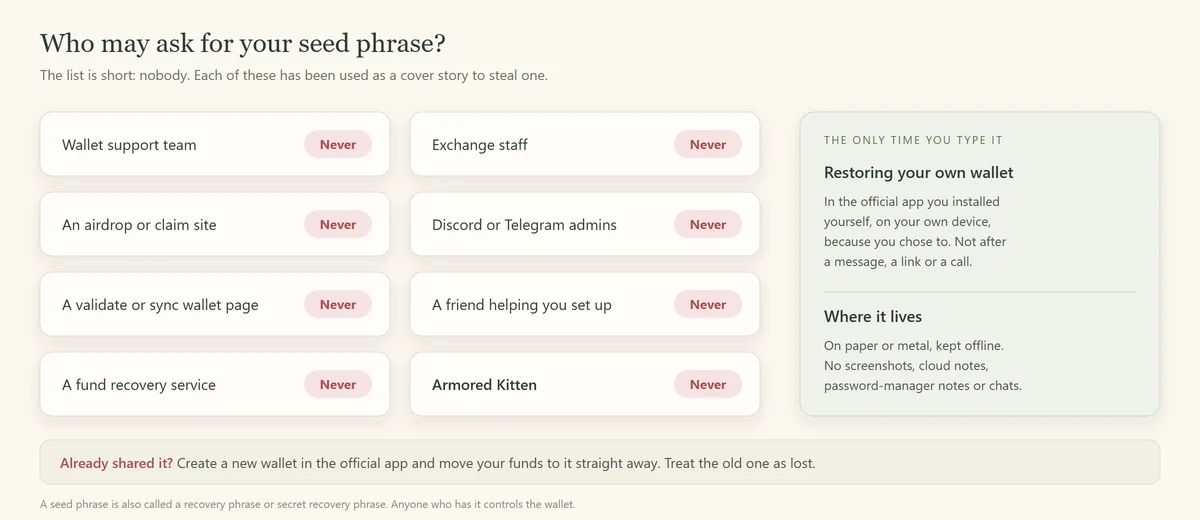
Keep public transaction references and the suspicious address for a report, but never post recovery words. Read the seed-phrase guide for the exposed-secret case and social scams for follow-up recovery pitches.
What genuine Armored Kitten links look like
Confirm the site through its published address, www.armoredkitten.com (the earlier address, armoredkitten.stonkbuilder.com, now forwards there), and verify an unexpected greeting with its sender through a channel you already know. A displayed sender name alone is not proof.
Reading an ordinary greeting should not require a wallet recovery phrase. An optional token claim or companion wallet link is a separate operation to inspect. See gift safety and the beginner scam checks before acting on an unfamiliar request.
Armored Kitten is an independent greeting studio and is not affiliated with or endorsed by Jupiter. Token gifts are optional, can change in value, and are not investment advice. Check the rules that apply where you live.