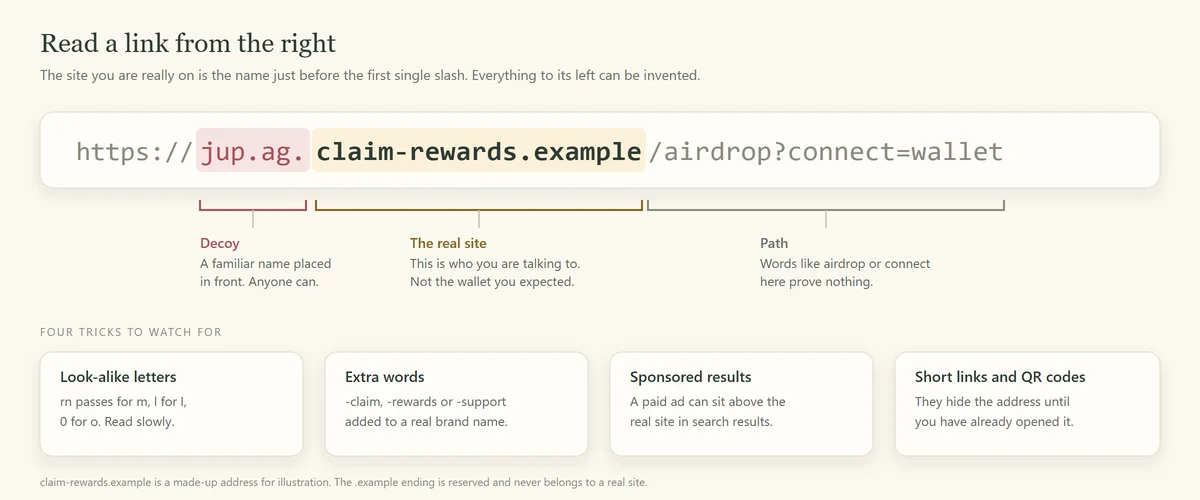
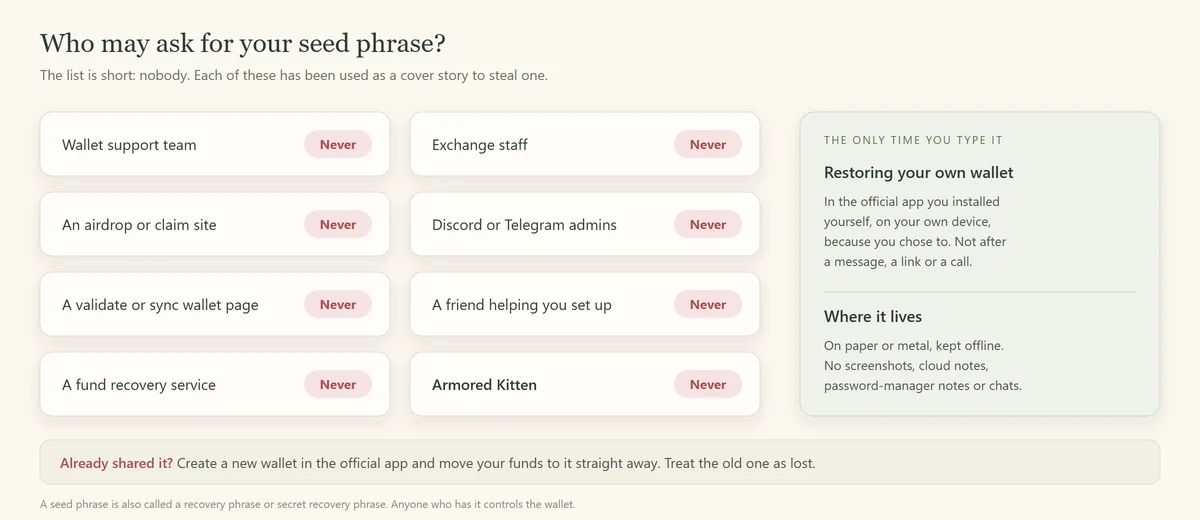
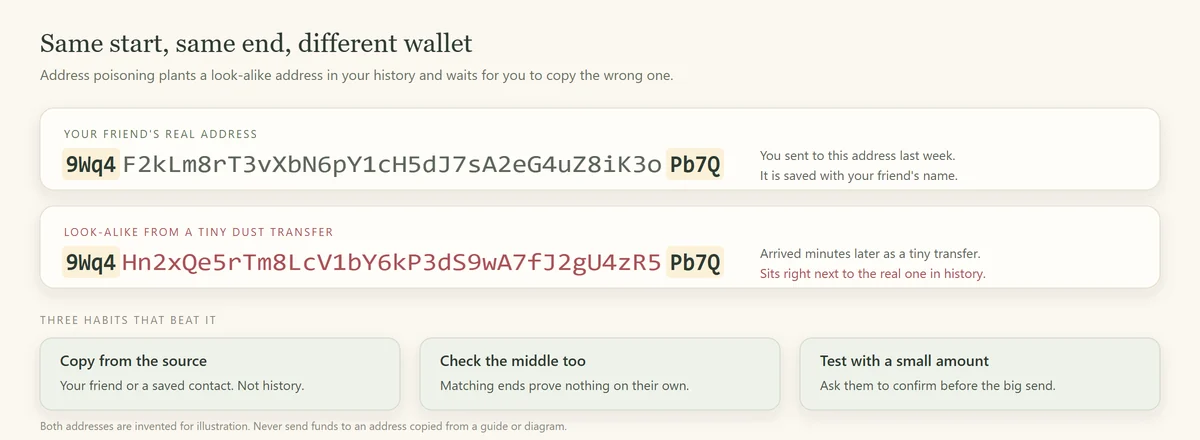
Before acting on a crypto message, identify what it asks you to give: money, a secret, a signature or control of an account. Then verify the request through an independent route. This guide connects five common situations with the checks and follow-up guides that fit them.
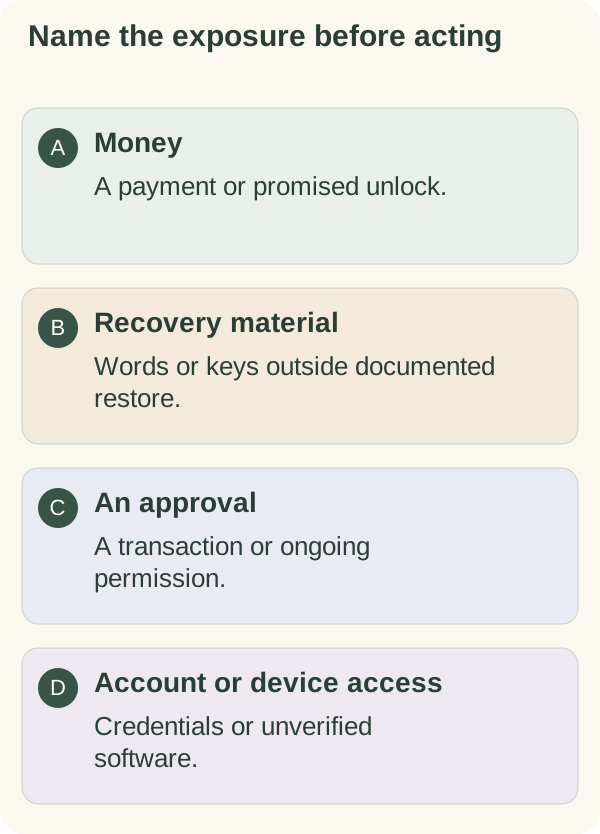
Why an unfamiliar workflow deserves a pause
A screen can look professional while asking you to do the wrong thing. When the terms, wallet prompts or recovery steps are unfamiliar, it is reasonable to stop and find the official explanation first.
Crypto transactions also differ from ordinary card payments. The FTC's consumer guidance notes that payments typically cannot be reversed. A self-custody wallet does not provide a general chargeback service, and token-level authorities can still impose restrictions. Owning wallet keys is not a guarantee that every asset can always be moved.
Four checks before you act
- Identify the request. Is it asking for a payment, credentials, a signature, an installation or another kind of access?
- Verify who is asking. Use a contact or official route you already know, not only the link or number in the new message.
- Inspect the destination. Check the full hostname, token mint or recipient address relevant to that operation.
- Read the effect. Compare the wallet or account permission with what you actually intended.
These checks reduce avoidable mistakes; they are not a guarantee against every exploit or compromised service.
Trap 1: Phishing links and fake sites
A copied website can ask for credentials, recovery words, software installation or an unwanted wallet action. A logo and HTTPS connection do not establish that you reached the intended service.
Use the phishing guide to distinguish a hostname from convincing text elsewhere in a URL, and to separate viewing a page from connecting, signing or disclosing secrets.
Trap 2: Requests for recovery material
Do not give a support contact, dapp or claim form your recovery phrase or private key. The wallet's own documented restore flow is a different operation that you initiate. Hardware and software recovery methods can differ.
The seed-phrase guide explains that boundary, backup handling and the exposed-secret case. Do not delete your only working wallet to test an uncertain backup.
Trap 3: Impersonation and relationship pressure
A copied or compromised account can look like someone you know. A patient new relationship can also introduce a false investment or a supposed emergency. Confirm an unexpected request through another established channel.
For a task platform, a displayed balance and an initial payout do not make a demand for your own deposit legitimate. The FTC's task-scam warning describes this pattern. Read social engineering for support, relationship and recovery approaches.
Trap 4: Look-alike tokens and addresses
A ticker or shortened address is insufficient. Check the full mint on the intended network and the recipient's actual destination. An unexpected transaction-history entry should not become your address book.
Use token and address checks to separate identity, authorities, transfer restrictions and destination errors.
Trap 5: Promised rewards that require another payment
Be wary of a promoter asking you to send funds to receive a larger payment, unlock supposed earnings or recover an earlier loss. Check the actual arrangement instead of accepting a screenshot of profits as evidence.
A disclosed network cost can exist in a legitimate transaction. That is different from an unverified person demanding a deposit to release a prize or refund. The FTC's recovery-scam guidance explains why an unexpected advance-payment request is dangerous.
Build your checks before you need them
Use verified wallet software and the maker's backup instructions. Keep account recovery material private. Learn how your wallet displays connected apps, permissions and transaction effects before relying on an unfamiliar flow.
For important decisions, take time to ask an appropriate independent person. An outside opinion can be useful, but it does not replace verifying the transaction yourself.
What to do if you think you have been scammed
Stop further interaction and identify what was exposed. A suspicious connection, a token permission, stolen account credentials, recovery-word disclosure and malware need different responses. Disconnecting an app does not by itself undo a transaction or remove every permission.
Open the affected provider's official incident instructions, retain relevant public transaction references and report through your local police or national fraud authority. Avoid posting secrets or unnecessary personal records. An unsolicited recovery offer can create a second loss; reporting does not guarantee repayment.
How this applies to Armored Kitten
An ordinary greeting and an optional wallet operation are separate. Confirm the sender of an unexpected greeting independently, and do not provide recovery words to read a card. If token gifting is available, inspect its current funding, claim, link-sharing and cost boundaries through gift safety.
Start with the deeper guide that matches your question. You do not need to buy a token or make a transfer to learn these checks.
Armored Kitten is an independent greeting studio and is not affiliated with or endorsed by Jupiter. Token gifts are optional, can change in value, and are not investment advice. Check the rules that apply where you live.